


Oasis
5.048.00 Reviews
App Specs
- Version
- 2.8.0
- Updated On
- License
- Free
- Downloads
- 10,000+
- Developer
- Mixtiles
- Categories
- House & Home
- Platform
- Android
Screenshots

 Analysis by AppCompare
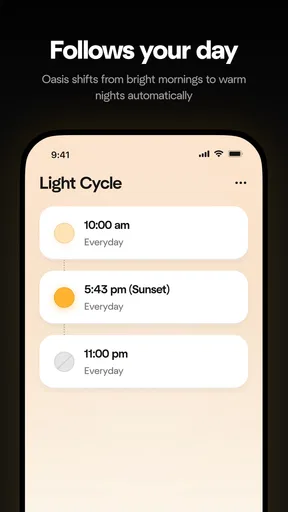
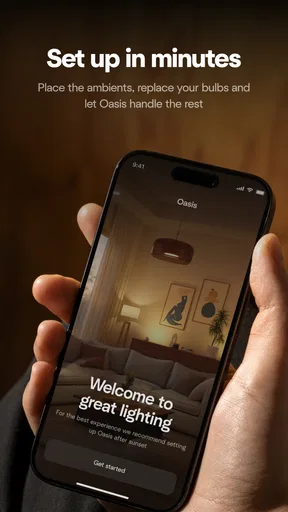
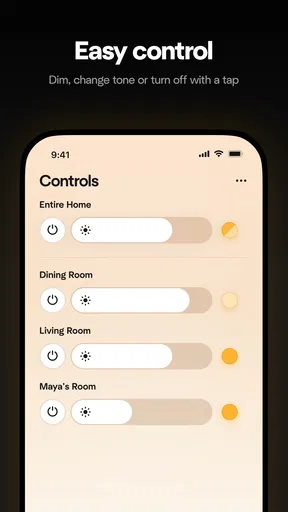
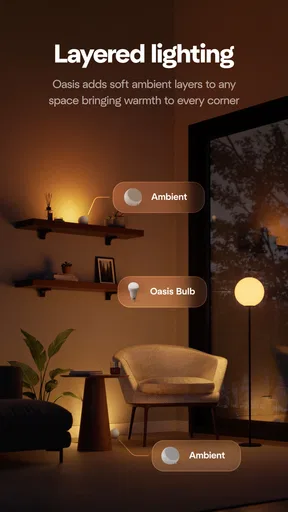
I approached Oasis as a practical house-and-home companion rather than an app I would open for entertainment. Its purpose is straightforward: it gives me a place to control the various Oasis products I use. That narrow focus is important. This is not trying to replace a general smart-home dashboard, organize an entire household, or become another social feed. Its value depends on whether Oasis products are part of my daily routine and whether controlling them from one app feels easier than using each product separately.
That makes the first impression slightly different from a typical lifestyle app. There is no reason to install it just to browse around. I would download it when I own an Oasis product, receive one as a gift, or want a single control point for several items from the same developer, Mixtiles. The app is free, aimed at Everyone, and currently sits at version 2.8.0, with support beginning at Android 7.0. Those details make it approachable for a wide range of Android users, although the real question is not compatibility; it is whether the products I need to manage are enough of a regular habit to justify keeping another control app on my phone.
What feels useful during the first week
During the first week, the appeal comes from reducing small points of friction. Instead of looking for a physical control, opening separate product interfaces, or remembering which control belongs to which item, I can turn to one Oasis-focused place. That sounds modest, but household convenience is often built from modest improvements. If I use an Oasis product every morning or evening, saving even a few steps can make the routine feel more settled.
I also like the clarity of a dedicated app in principle. A broad smart-home platform can be powerful, but it may bring unrelated devices, complicated menus, and settings I never touch. Oasis has a more limited job, which can be an advantage for someone who wants to manage Oasis products without learning a larger ecosystem. The app feels most appropriate for people who prefer a focused tool over a universal control center.
The strongest early use case is a home with more than one Oasis product. Managing a single item through a dedicated app may not feel dramatically better than using its included controls, depending on the product. With several items, the reason for the app becomes easier to understand: I can build the habit of checking one place rather than treating every product as a separate object with its own routine.
A realistic example would be an evening reset. I come home, open the app, check the Oasis products connected to my household, and make the adjustments I need before settling in. The benefit is not excitement; it is consistency. A control app earns its place when it removes a repeated interruption from an ordinary day. If I only use a product once every few weeks, that advantage quickly disappears.
The early experience also depends on how comfortable I am with app-based control. Someone who already keeps a phone nearby may appreciate having the controls available there. Someone who prefers buttons, switches, or physical remotes may see the app as an extra layer rather than an improvement. I would not recommend installing it simply because it belongs to the House & Home category. I would install it because the products I own make centralized control worthwhile.
Worth Reading Before You Choose

Flipboard Shows What News Apps Must Do Beyond the Feed

Switching to Android Auto Means Rethinking Your Driving Routine

Google Calendar Makes a Crowded Week Easier to Manage

Ludo King Makes the Most of the Minutes Between Plans

Baby Panda World Brings Quick Play to Modern Phones, but Its Game Library Feels Busy

ESPN’s Live Game View Makes Following Close Games Easier
Its public reception is encouraging: Oasis has an average rating of 4.9 from around 180 ratings, alongside roughly 50 written reviews. It has passed 10,000 installs, which gives it a small but visible user base. I would treat those figures as a positive signal rather than proof that it will fit every household. A high rating can show that the basic experience works well for people who already have a reason to use it, but it cannot remove the central dependency on compatible Oasis products.
The setup decision matters more than the download
Before installing, I would first make a simple inventory of my Oasis products and ask how often I actually adjust them. This is a better test than judging the app from its icon or short description. If I have one product that rarely needs attention, the app may become digital clutter. If I have several products or make frequent changes, the same download can become a useful daily shortcut.
I would also give myself time to establish a consistent naming and organization habit inside the app, where the available controls allow it. A control tool becomes harder to use when I cannot immediately tell which item I am changing. Even without assuming advanced automation, a clear personal convention helps: I think in rooms and routines, not in vague product labels. That is a small but non-obvious improvement because it shifts the app from a technical panel into something I can use quickly when distracted.
Another useful first-week test is to use the app at the least convenient moment, not only when I am sitting comfortably with time to spare. I would try it while leaving the house, preparing for bed, or handling several household tasks. Those moments reveal whether the control flow is genuinely quick or whether I still reach for a physical alternative. An app can look perfectly acceptable during a calm trial and still fail as a daily tool if it demands too much attention during a busy routine.
Why the value may or may not survive from month to month
After the novelty fades, Oasis has to justify its space through repetition. The app is not likely to become a destination I explore for long periods. Its lasting value is closer to that of a remote control: I open it, complete a task, and leave. That is a good design goal for this kind of product. If I find myself spending time searching through the interface, the app is working against its own purpose.
For a household with recurring Oasis routines, the month-to-month benefit is convenience and familiarity. I learn where to look, which product needs attention, and which actions I perform most often. That learning curve should eventually make the app feel almost invisible. In my view, that is the right measure of success: not how impressive the first session feels, but how little thought is required after several weeks.
The app is especially sensible for people who move between rooms or share responsibility for household products. A phone-based control point can be easier to hand over than a collection of small remotes or product-specific instructions. It may also help a household remember which product belongs to which routine. I would still avoid presenting it as a complete home-management system. Its focus is Oasis products, so its usefulness grows with that ecosystem rather than with every device in the home.
That ecosystem focus is also the main trade-off. A general smart-home platform may be a better long-term choice for someone who wants one place for products from many manufacturers. A physical control may be better for a person who does not want to unlock a phone for a simple adjustment. Oasis makes more sense when consistency within the Oasis range matters more than universal compatibility.
I would judge the monthly experience by three questions. Do I open it repeatedly without having to think about where controls are located? Does it save me enough effort compared with the usual alternative? Does it remain useful when I am not actively experimenting with the product? If the answer to all three is yes, the app has recurring value. If the answer is no, its excellent rating will not change my personal conclusion.
Small habits that make a control app last
One habit I would recommend is using Oasis at the same transition points each day. For example, I might check it when starting the morning routine and again during the evening shutdown. The point is not to create unnecessary screen time. It is to attach the app to moments that already exist, so I do not need to remember a separate maintenance task.
I would also avoid opening the app merely to confirm something that has not changed. That is where control apps can become tiring: the user starts checking instead of acting. I get more value when I open Oasis with a clear purpose, complete the adjustment, and close it. This keeps the app in the background of my home life rather than turning it into another notification-driven habit.
For households with multiple users, I would agree on simple language for identifying products and routines. Even if each person uses the app independently, shared terms reduce mistakes. This is particularly useful when one person is trying to make a quick change for another. The insight here is that the app’s long-term usability is partly social; a technically capable control screen can still feel inconvenient if everyone describes the same product differently.
Where maintenance and everyday friction appear
The maintenance burden is not necessarily about frequent work inside the app. It is more about remembering that the app exists, keeping it available on a compatible phone, and making sure my household still benefits from app-based control. A free app is easy to keep installed, but easy to ignore as well. If I stop using the Oasis products regularly, the app can quietly become unnecessary.
There is also a practical dependence on the relationship between the phone, the app, and the Oasis products. Whenever a control app is involved, I am adding a digital step to a physical task. That can be worthwhile, but it means I should not assume the phone is always the fastest option. If I need an immediate adjustment and the physical control is already in my hand, using the app may be less convenient.
I would keep the app updated rather than treating installation as a one-time event. The current release is 2.8.0, and staying current is a sensible way to benefit from ongoing compatibility and usability work without making claims about features that are not part of the app’s stated role. I would also avoid filling my phone with duplicate control routes unless each one serves a different purpose. If I have a product-specific method that is faster for a frequent action, I would keep using it and reserve Oasis for the situations where centralization helps.
Another maintenance issue is mental rather than technical: remembering which actions belong in the app. A control app becomes frustrating when I expect it to manage things outside its scope. Oasis is designed around Oasis products, so I would not use it as a replacement for broader home organization, shopping, repairs, or device management. Keeping that boundary clear prevents disappointment and makes the app feel more focused.
For someone buying an Oasis product for an older family member, I would consider the person’s comfort with smartphones before relying on this app as the main control method. The Everyone age rating makes the app broadly suitable from a content perspective, but age suitability is not the same as ease of use for every household member. A physical alternative may remain important when the user wants immediate access without navigating a phone.
What can create fatigue over time
The first source of fatigue is repetition without enough payoff. If every adjustment requires opening the phone, finding the app, waiting for the right screen, and then returning to the task, the convenience disappears. This is why I would test the app during real routines instead of judging it only from a quiet setup session.
The second is ecosystem fragmentation. I may enjoy having Oasis products in one place, but I may not want a separate app for every brand in my home. A dedicated app is easier to understand than a huge universal platform, yet several dedicated apps can produce their own clutter. Oasis is a good fit when its products form a meaningful group in my household, not when it is one isolated item among many unrelated devices.
The third is the temptation to over-manage. A control app can make me feel that every household action should be optimized from a screen. I do not think that is automatically better. If a simple physical action is faster, more reliable, or easier for everyone at home, I would keep it. The app should remove friction, not create a reason to monitor ordinary life more closely.
There is also a difference between control and automation. I would not assume that installing Oasis transforms a routine into a fully automatic system. Its clear role is control of Oasis products. If my priority is elaborate cross-brand scenes or a single dashboard for an entire connected home, I would investigate a broader platform instead. That option may involve more complexity, but it could better match that specific goal.
Who should keep Oasis installed
I would recommend keeping it installed if I use multiple Oasis products, adjust them regularly, or share a home where one central control point makes routines easier to explain. It is also a reasonable choice for someone who prefers phone-based access and wants a focused app rather than a crowded general-purpose home platform.
I would be more cautious if I own only one Oasis product and rarely change it. In that situation, the app may still be useful, but I would compare it honestly with the product’s usual controls. If the phone is not already part of the routine, adding it may not improve anything. The same applies to people who strongly prefer physical controls or who are trying to reduce the number of apps on their devices.
For anyone considering an Oasis product, I would think about the control method before buying into the routine. The app is free, supports Android devices starting with version 7.0, and is suitable for Everyone, so the barrier to trying it is low. The more important commitment is behavioral: am I willing to use a phone as part of managing these household products? If yes, the app can make the ecosystem feel more coherent. If no, I would prioritize products that remain comfortable to operate without it.
Mixtiles has kept the concept deliberately focused, and I see that as both its strength and its limit. The strength is that the app has a clear reason to exist. The limit is that its usefulness does not expand much beyond the Oasis product family. That is not a flaw for the intended user, but it is a decisive consideration for anyone looking for an all-in-one home-control solution.
My long-term verdict
After the first-week appeal wears off, Oasis earns a lasting place only when it becomes part of a repeated household rhythm. I would not keep it because it is new, because its rating is high, or because every smart-home product needs an app. I would keep it because it makes several Oasis products easier to handle at the moments when I actually use them.
My honest view is that the app is best understood as a focused convenience layer. It does not need to entertain me or manage every part of the home. It needs to make Oasis products more approachable and reduce the small annoyances that accumulate around separate controls. When it succeeds, I barely notice it; that quiet usefulness is exactly what I want from a home-control app.
The trade-off is equally clear. A single Oasis product used occasionally may not justify another app, and a home filled with different brands may be better served by a broader control platform. People who prefer physical controls should also keep that preference in mind rather than assuming a phone-based option is automatically superior.
For the right household, I would recommend trying Oasis and evaluating it over several ordinary weeks, not just during setup. Watch whether it shortens routines, whether other household members can use it comfortably, and whether you still reach for it after the novelty disappears. If those answers are positive, the free app has a practical role. If not, uninstalling it is a reasonable conclusion, not a failure. Its lasting value comes from repeated usefulness, not from novelty.
Pros
- Calm visual design creates a relaxing atmosphere.
- Simple controls make it easy to start playing quickly.
- Short sessions fit well into brief breaks.
- Gentle audio complements the peaceful gameplay.
- Works well for players seeking a low-pressure experience.
Cons
- Limited challenge may feel repetitive over time.
- Progression can seem slow for goal-oriented players.
- Some features may require in-app purchases.
- The tranquil pace may not suit action fans.
- Performance can vary on older devices.
FAQs for Oasis
What is Oasis and what can I use it for?
Oasis is an app designed to provide a focused digital experience centered on discovering, organizing, or enjoying its available content and features. Its exact usefulness depends on the version and platform you install, so it is worth reviewing the store description before downloading. During use, explore the main navigation, settings, and privacy options first so you understand how the app works and what information it may request.
Is Oasis free to download and use?
Oasis may be available as a free download, but some features, content, or usage limits can depend on in-app purchases or a subscription. Before confirming an installation or payment, check the current listing in Google Play or the App Store for pricing, trial conditions, renewal details, and cancellation instructions. Store prices and available plans can vary according to your country, device, and operating system.
What permissions does Oasis require?
The permissions requested by Oasis can vary depending on the functions enabled on your device. An app may ask for access to notifications, storage, camera, microphone, location, or account information when those features are relevant. We recommend reviewing each permission request instead of approving everything automatically. If a permission seems unrelated to the app’s purpose, deny it and check whether the application remains usable.
Is Oasis safe and suitable for my device?
Download Oasis only from an official source such as Google Play or Apple’s App Store, where the publisher information, ratings, privacy details, and update history can be checked. Keep your operating system updated and avoid modified APK files or unofficial download pages. Compatibility requirements may differ between Android and iOS, so confirm the supported version, available storage, and device requirements before installing.
Does Oasis work offline, and what should I know about privacy?
Some parts of Oasis may work without an internet connection, while account features, synchronization, updated content, or online services generally require mobile data or Wi-Fi. The app’s privacy practices also depend on the information you provide and the permissions you allow. Before creating an account, read the privacy policy, check whether data is shared with third parties, and use the in-app controls to limit personalization where available.


